Appearance
A one-page overview · Print or save as PDF (File → Print → Save as PDF)
App: Moving Picture Puzzle · Ages: generally suitable for children; see Lightning note below
Updated: June 2026 · Full store copy
What it is
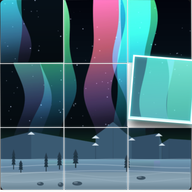
Moving Picture Puzzle is a calm puzzle game. The screen shows a live animation (fireflies, rain, aurora, waves, and more) split into tiles that are out of order. The player taps two tiles to swap them until the animation looks whole again.
- No reading is required to play.
- It is a game, not a medical or therapy product.
- Works offline after install.
How to play (30 seconds)
- Choose a puzzle from the menu. Start with Beginner (3×3) for younger children.
- Tap one tile, then another — they swap.
- Keep swapping until the motion lines up. A small hint can show what the solved picture should look like.
- When finished, the app may show a short cheer or message (you can turn this off).
Settings worth knowing
Find these on the menu and play screens (scroll if needed on small phones).
General
| Setting | Default | What it does |
|---|---|---|
| Celebrations | On | Short sound and confetti when a puzzle is solved |
| Reduce motion | Follows device | Softer movement; no confetti when on |
| Zen mode | Off | Hides timers and ranking text — play without time pressure |
Calm session recipe: Beginner puzzle + Zen mode on + Reduce motion on. Turn Celebrations off if sound or confetti is too much. Or tap Calm visual preset (see below).
Vision (menu → Vision group)
All vision options are off by default. The puzzle looks normal until you turn them on. Settings are saved on the device.
| Setting | When to use it |
|---|---|
| High contrast | Menus and puzzle framing are easier to read in bright light or if text/lines feel faint |
| Bold tile borders | Harder to lose track of tile edges on busy animations (especially Hard 8×8) |
| Reference: tap to expand | Player can open a larger view of the solved picture while playing (helpful for low vision) |
| Color-safe palette | Colors that are easier to tell apart for many types of color blindness (animated puzzles recolor; your own JPEG photos keep their original colors) |
| Tile texture cues | Faint line or dot pattern on each tile so pieces can be told apart without relying on color — can make edge-matching harder on busy Hard grids; try shape marks or color-safe first |
| Shape selection marks | Selected tiles and swaps use corners and shapes instead of yellow/red fills |
One-tap presets (same menu):
| Preset | Turns on |
|---|---|
| Low vision preset | High contrast, bold borders, large reference, tile texture cues, shape selection marks |
| Color-blind safe preset | Color-safe palette, bold borders, tile texture cues, shape selection marks |
| Calm visual preset | Reduce motion, celebrations off |
Suggested starting points:
- Low vision or small screen: Low vision preset, then Beginner or Standard grid before Hard 8×8.
- Color blindness: Color-blind safe preset; add Reference: tap to expand if they still get stuck.
- Overwhelmed by motion or fanfare: Calm visual preset + Zen mode.
- Hard 8×8 and they solve by lining up edges: Try bold borders and color-safe without tile texture cues, or turn texture cues off if seams are hard to see.
Note: On Hard (8×8) with vision assists on, tiles that are already in the correct place may show a subtle outline all the time (not only after Hint). That is intentional for accessibility; it can feel like a spoiler during auto-solve — turn vision assists off if you want a “clean” board for demonstrations.
Good puzzles to start with
Gentle, predictable motion:
- Fireflies (Beginner)
- Bubbles (Beginner)
- Snowfall (Beginner)
- Ripples (Beginner)
Photo puzzles and Create (your own picture) can feel familiar and comforting.
Use caution with
Lightning puzzles include bright screen flashes. The menu shows: “Contains screen flashes.”
Skip or preview first if your child is:
- Young and easily startled
- Photosensitive or prone to migraines
- Uncomfortable with storm imagery
Photos & privacy
- Your photo and Create use pictures from the device gallery.
- Treat as on-device play unless your privacy policy states otherwise at launch.
- No account is required for core play.
What children practice
- Looking carefully — matching edges and motion across tiles
- Patience — trying swaps without a ticking clock (especially in Zen mode)
- Confidence — hints and friendly messages when they finish
For neurodivergent children
Many families use:
- Zen mode — less pressure from times and leaderboards
- Reduce motion — less intense animation and no confetti
- Celebrations off — solve without extra sound or visuals
- Calm visual preset — reduce motion + no celebrations in one tap
Adjust to the child in front of you; there is no single “correct” setup.
For low vision or color blindness
- Vision options are optional and reversible — default play is unchanged.
- Hints still work: a small reference image and friendly copy; Reference: tap to expand makes that image easier to use.
- Photo puzzles and Create (your picture) do not recolor the photo itself; overlays and tile cues are drawn on top for matching help.
- If a child relies on spotting mismatched edges between tiles, avoid tile texture cues on Hard grids or switch to a smaller grid.
Quick troubleshooting
| Situation | Try |
|---|---|
| Too hard | Smaller Beginner grid; use hint; try Low vision or Color-blind safe preset |
| Too stimulating | Calm visual preset; avoid Lightning |
| Child upset by timer | Zen mode on |
| Doesn’t want fanfare | Celebrations off |
| Can’t tell tiles apart | Color-blind safe or bold borders; Reference: tap to expand |
| Colors blur together | Color-safe palette on |
| Can’t see grid lines | Bold tile borders on |
| Edges hard to match with cues on | Turn tile texture cues off; keep shape selection marks or bold borders |
Contact & feedback
Support: support@hushworks.studio · mpp.hushworks.studio/support
Privacy policy: privacy@hushworks.studio · mpp.hushworks.studio/privacy
We welcome suggestions to make the app more inclusive.
Moving Picture Puzzle · Caregiver guide v2 (vision accessibility) · Not medical advice.